I tested Bark for more than a year because I wanted one thing from it: reliable, intelligent alerts about my 12-year-old’s messages and online activity. We already use Life360 for location sharing and Apple Family for parental controls. I wasn’t asking Bark to replace our whole family's safety setup. It had one clearly defined job: identify genuine risks in my son’s digital activity and alert me when something needed my attention.
Bark's job is to help us understand whether risky conversations or online activity were happening on my son's iPhone.
In my experience, it failed at that job.
Quick verdict
After more than a year of testing Bark with my son's iPhone, I stopped recommending it for iPhone families who mainly need message monitoring and safety alerts.
In my testing, Bark did not reliably connect, produced too many low-quality alerts, and did not give me enough context to trust what it was flagging.
Best for: Parents who are willing to troubleshoot Bark's setup and use it as one layer of a broader safety system.
Not ideal for: iPhone families who need reliable iMessage visibility and useful risk alerts.
What I needed instead: Bark was supposed to help me understand risk inside my son's conversations. I wanted alerts that showed the pattern, explained why it mattered, and gave me enough context to decide whether to step in. That is the problem I built Joey Family [https://www.joeyfamily.com] to solve.
Bark iPhone review scorecard
| Area | Rating | Why it matters |
|---|---|---|
| iPhone connection reliability | ❌ Poor | Devices frequently disconnected, making monitoring inconsistent. |
| Alert quality | ❌ Poor | Alerts lacked detail or were clearly incorrect, adding unnecessary noise. |
| iMessage monitoring | ⚠️ Limited | Monitoring depended on the device remaining connected and syncing reliably. |
| Context provided in alerts | ⚠️ Limited | Alerts often lacked enough information for parents to understand the situation. |
| iPhone app coverage | ⚠️ Limited | Some advertised monitoring features were unavailable or inconsistent on iPhone. |
| Customer support | ❌ Poor | Support responded, but the underlying reliability issues were not resolved during testing. |
| Overall verdict | ⭐ 2/5 | Reliability issues significantly reduced the app's usefulness for monitoring an iPhone. |
What I tested
This review is based on one real job I needed Bark to do: help me understand message and online activity risk on my son's iPhone.
- My son's iPhone was connected through my Windows PC.
- I tested Bark for more than one year.
- We did not use Bark for location because we use Life360.
- We did not use Bark for parental controls because we use Apple Family.
- Bark's job was messaging monitoring, online activity risk alerts, and iMessage visibility.
- Most of my real-world usage was focused on iMessage.
That matters because Bark does more than iPhone monitoring. Some families may get value from other parts of Bark. This review isn't an assessment of every Bark product or setup. Instead, it's focused on one question: whether Bark earned my trust as the primary message monitoring app for my son's iPhone.
Problem one: Bark would not reliably connect to my son's iPhone
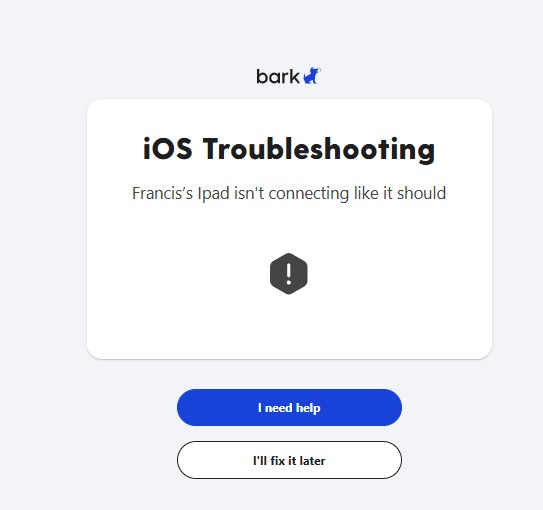 The most basic failure: Bark repeatedly could not connect to my son's iPhone.
This was the key issue for me.
The majority of the time, Bark would not connect to my son's iPhone. Even when I manually tried to force a scan. Even when I followed their setup steps. Even after months of trying. I spent many frustrating hours on this. Restarting. Reconnecting. Re-authorising. Reading support articles. Trying again.
Most attempts ended the same way: no scan, no data, and no alerts. For a monitoring product, that means no protection.
What made it worse was the experience on my son's phone. When Bark did try to connect, he would get deluged with pop-ups asking for permission. The "Trust This Computer" prompt loop became part of the routine. It was intrusive, confusing, and frustrating for him. And after all of that, it still did not work.
If a safety product cannot reliably connect to the device it is meant to monitor, it does not work.
Problem two: the alerts were mostly incorrect or meaningless
On the rare occasions Bark did manage to scan, the alerts were bad.
Most of the alerts were either meaningless or incorrect. Playful messages were flagged as serious. Normal kid language was pulled out of context. Single phrases were highlighted with no sense of what came before or after.
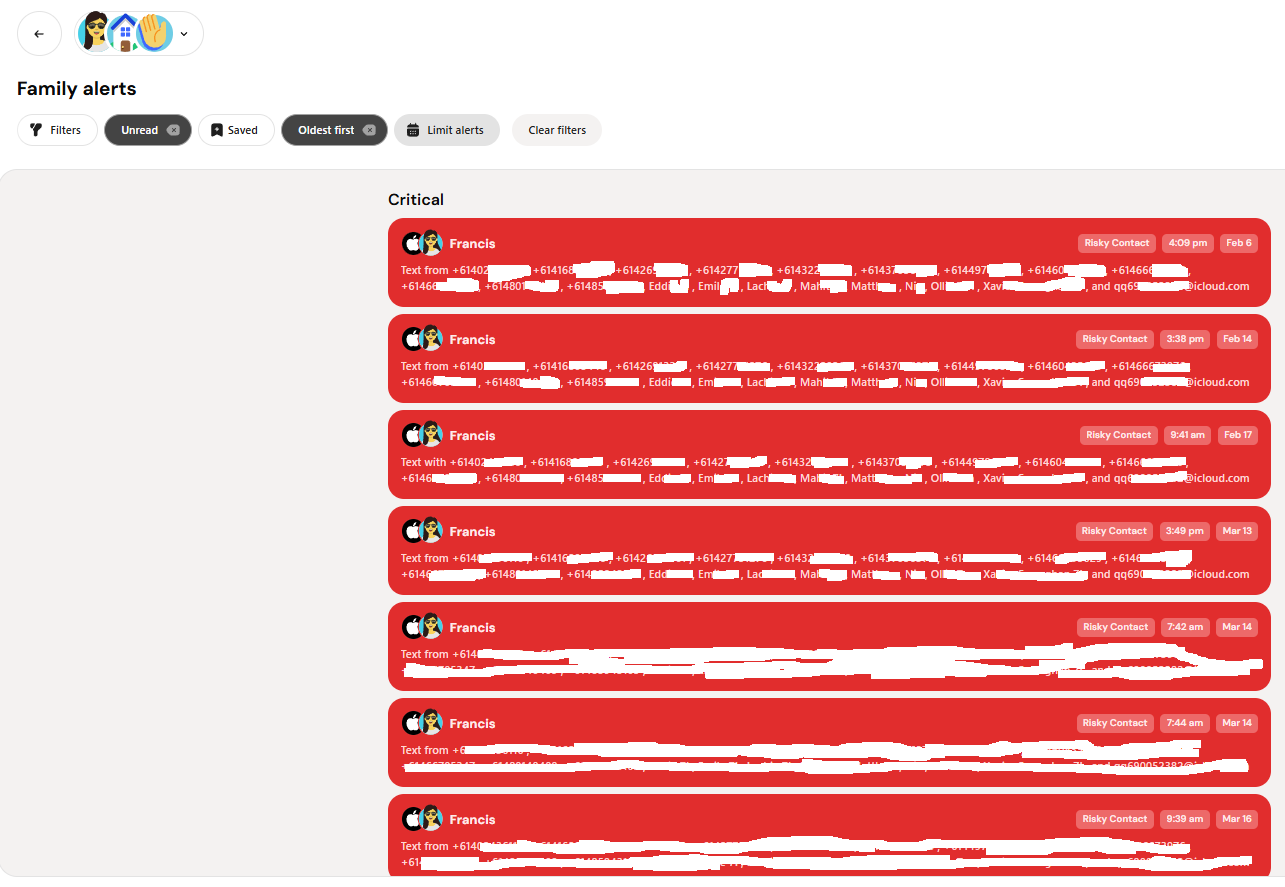 The parent dashboard became a flood of low-value alerts. In this case, group chat numbers not saved in my son's contacts were repeatedly treated as risky contacts.
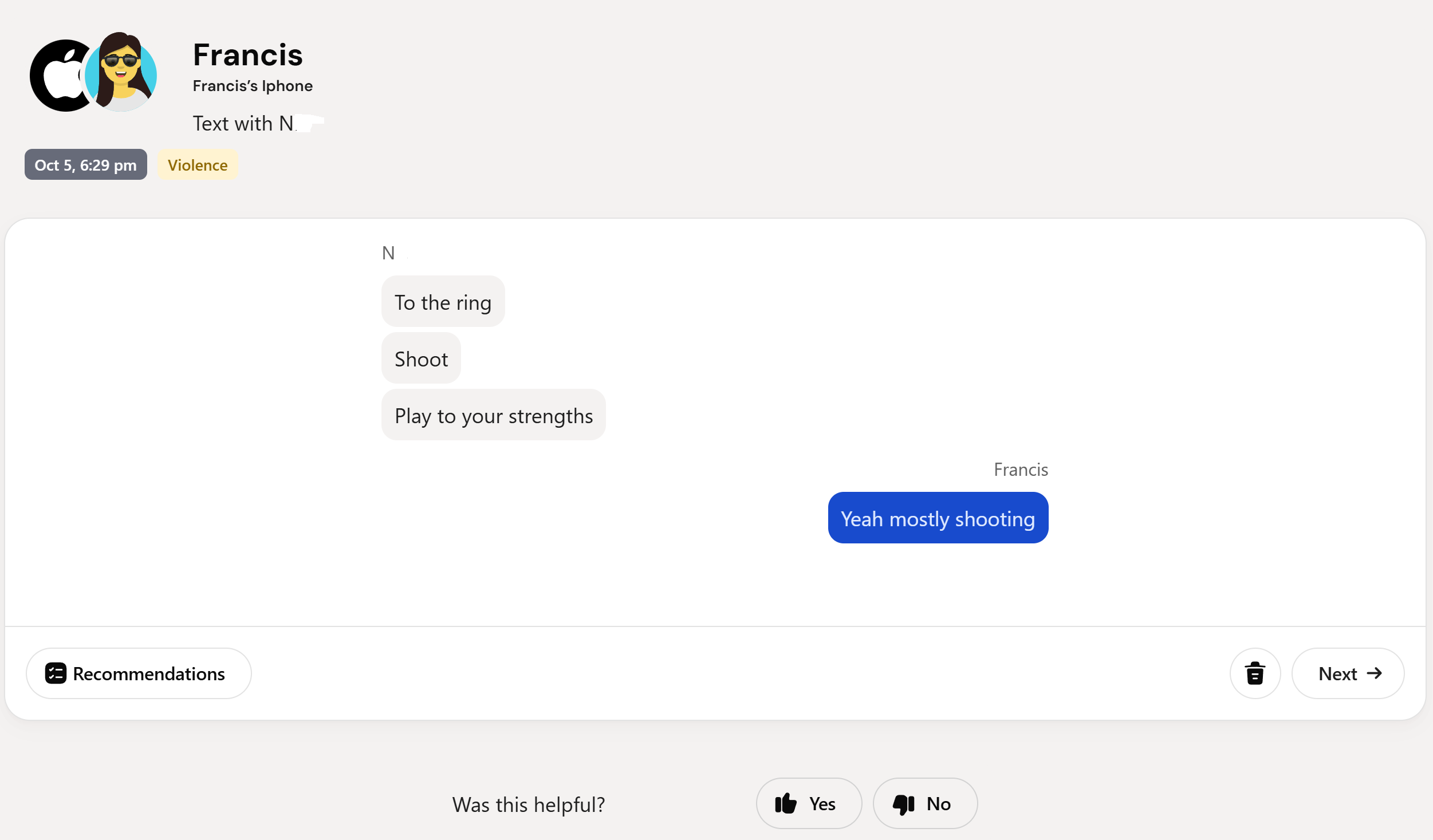 Here my son and his friend were discussing basketball, and Bark flagged the conversation as violence.
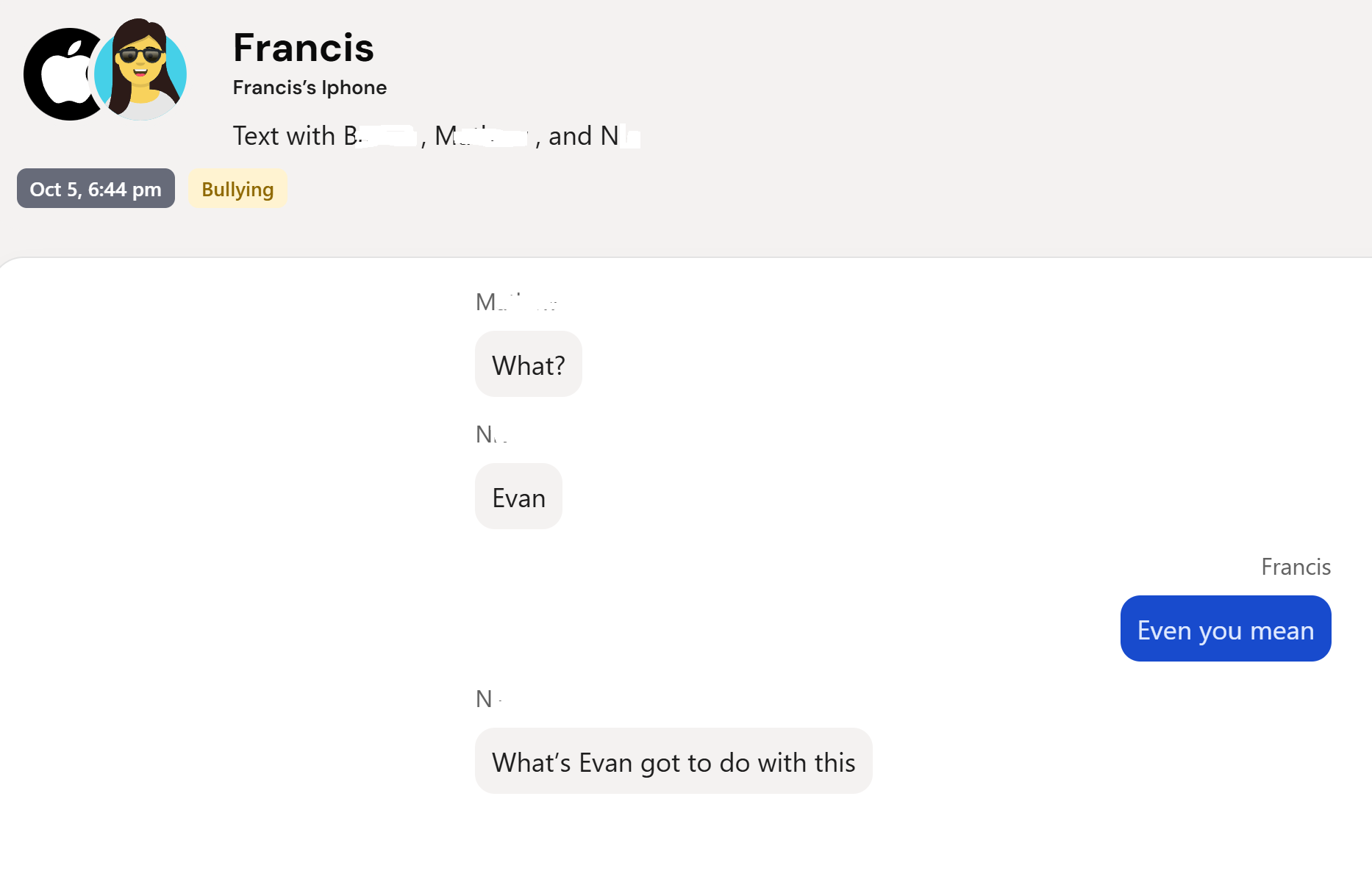 Another normal child conversation was pulled into a serious alert category without enough context to make the alert useful.
Instead of being alerted to real problems, I was sifting through false alerts trying to work out what mattered. Over time, this creates alert fatigue. You stop trusting the system. You start ignoring notifications. A product that floods parents with low-quality alerts can train parents to stop trusting the alerts.
That is not a small product issue. For a safety tool, trust is the whole thing.
Problem three: Bark's monitoring model ignores how kids actually communicate
This is the deeper issue, and it explains why the alerts felt so poor.
Bark appeared to flag isolated messages. Single lines. Individual phrases. Moments pulled away from the conversation around them. In my experience, that is not how kids communicate and it is not how the risks parents worry about usually appear.
They communicate through tone, repetition, escalation, silence, inside jokes, group dynamics, and shifts over time.
Bullying often shows up as repetition, exclusion, pile-ons, and a group slowly normalising cruelty. Grooming often shows up through secrecy, pressure, emotional manipulation, boundary testing, and a gradual shift in tone. Distress often shows up across time, not in one sentence.
The hard part is not spotting one word that looks bad. The hard part is understanding whether the conversation is becoming unsafe.
When the product does not provide that context, the hard work gets pushed back onto parents. The exact people who bought the product are already stretched, so the hard work gets pushed back onto them.
What useful alerts look like
Real examples from Joey's Kezza demo show the concerning message with enough surrounding context to help a parent decide what to do next.
Problem four: the app coverage was not sufficient for us on iPhone
Bark markets broad app coverage. That creates an expectation. In practice, the marketing promise did not match my iPhone experience.
Some apps could not be connected in the way I expected. Others depended on integrations that felt fragile. Others required repeated re-authorisation or troubleshooting. Some screens made it clear that coverage was not available on iOS.
The app list created expectations the product did not meet for us.
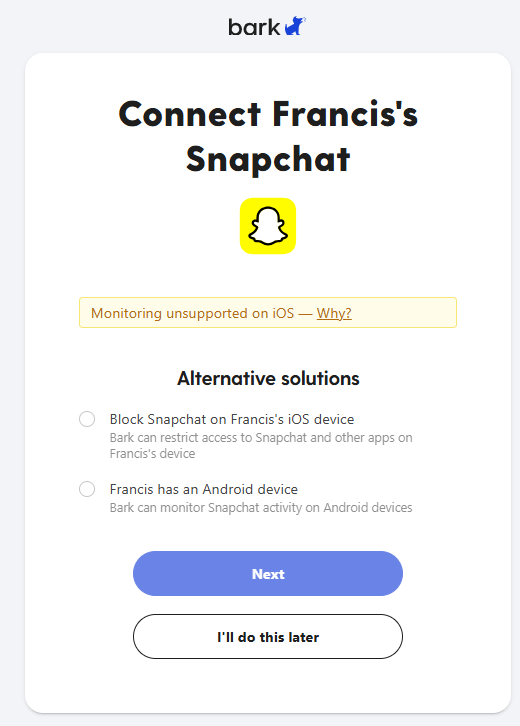 This was the kind of screen that made the broad app coverage promise feel overstated for iPhone families.
Before trusting any app coverage list, test:
- Does the app actually connect on your child's iPhone?
- Does it stay connected for more than a few days?
- Does it require repeated re-authorisation?
- Does it show current messages?
- Does it alert on context, or just isolated words?
For our family, the iPhone reality mattered more than the app list.
Problem five: support didn't resolve the core issues
When you are dealing with your child's safety, support quality matters.
My issue with Bark support was not that anyone was rude or unhelpful. The issue was that the support path did not solve the real problem. I was pointed back to setup steps. Articles. Retry flows. Re-authorising. Trusting the computer again.
But the core issue remained: Bark did not reliably connect to my son's iPhone.
Support can help with confusion. It can help with setup mistakes. It can help explain a workflow. It cannot make a parent trust a safety product that keeps failing at the moment it needs to scan.
Bark vs Apple Family, Life360, and Joey
This is how our family thinks about the tools now.
| Tool | What we use it for | Why |
|---|---|---|
| Apple Family | Parental controls | It handles the device-level restrictions we need. |
| Life360 | Location | We already use it and like it for family location. |
| Bark | Tested for message and activity alerts | In my testing, it did not work reliably enough on iPhone. |
| Joey Family | Message-risk context | Joey is being built around contextual message understanding, not isolated alert pings. |
I would not describe Joey as a replacement for Apple Family or Life360. Those tools do different jobs.
Apple Family handles boundaries. Life360 handles location. Joey helps parents understand message risk in context.
That is the job I wanted Bark to do for us.
What is the best Bark alternative for iPhone families?
It depends on what job you need done.
We use Apple Family for parental controls, Life360 for location, and Joey Family for message-risk context.
If your main concern is device boundaries, start with Apple Family.
If your main concern is location, use a tool built for location.
If your main concern is iPhone message monitoring, look for a tool that proves it is syncing, shows context, and reduces alert fatigue rather than creating more work.
My honest takeaway after a year of testing
Bark sounds good in theory. The promise is exactly what parents want to hear.
In practice, it failed where it mattered most for our family.
- Bark did not reliably connect to my son's iPhone.
- Its alerts were noisy and low quality.
- Its monitoring model did not give me enough context.
- Its app coverage felt overstated for our iPhone setup.
- And when things broke, support did not bridge the gap.
Most importantly, it did not earn my trust.
If you are an iPhone parent considering Bark, my advice is simple: test it thoroughly. Do not assume it is working because the dashboard looks quiet. Force a scan. Check the last successful sync. Review the alerts. Ask whether the product is helping you understand real risk, or just keeping you busy.
If your main concern is iPhone message safety, Joey is being built around a problem I struggled with when testing Bark: understanding conversations in context rather than overwhelming parents with isolated risk alerts.