Which iPhone monitoring tool should families use to secure their children's iPhones?
When parents search for a "parental monitoring app", they are usually trying to solve a simple problem: How do I protect my child online without reading every message or turning our home into constant surveillance?
After speaking with parents over the past few months, we found that most families are looking for one or more of three outcomes:
- Boundaries (setting guardrails): Managing when children use devices, and which type of apps they can use. For example, screen time limits, app and website blocking, downtime, and device rules.
- Signals (knowing when to pay attention): Alerting parents to potential risks such as bullying, harmful conversations, risky contacts, scams, explicit content, or signs of emotional distress.
- Context (knowing what’s really happening): Helping parents understand patterns, changes in behaviour, and the bigger picture behind individual conversations or alerts.
Most parental control products are strong in the first category. Apple's built-in Family Sharing and Screen Time features provide many of the controls families need, although setup can be frustrating.
Where many parents still feel blind is in the second and third categories: signals and context.
This is especially true on iPhones, where Apple intentionally restricts access to iMessage and other Apple services. These protections are important for privacy and security, but they also make it difficult for third-party apps to provide deep monitoring of conversations and activity.
As a result, iPhone monitoring tools rely on different approaches and workarounds, each with trade-offs around privacy, reliability, coverage, and alert quality.
This review focuses specifically on monitoring and safety alerts. We did not evaluate screen time controls or location tracking, because our household uses Apple's Family Sharing and Screen Time for device boundaries, and Life360 for location sharing. We recommend both approaches.
We tested three popular iPhone monitoring tools in a real family setup:
| BrightCanary | Bark | Joey Family |
|---|---|---|
 |  |  |
Quick verdict
Best for parents who want near real-time visibility across lots of apps on iPhone and understand the trade-off: BrightCanary Parental Controls (Text Message Plus)
BrightCanary takes a different approach by prioritising speed and broader activity visibility. Its keyboard-based monitoring can provide near real-time insights into what children are typing.
This approach can be useful for parents who want more immediate visibility, but it comes with trade-offs. Keyboard-based monitoring requires a higher level of access on the device, and parents should consider the privacy implications and the possibility that children may find ways to disrupt the monitoring.
Best for families wanting an established parental control ecosystem: Bark Premium
Bark is one of the most established names in parental monitoring and offers a wider set of parental control features, including screen time management and location features.
However, in our testing, Bark's iPhone monitoring experience was less consistent than expected. Connections were sometimes unreliable, and alerts often lacked the context needed to understand whether a situation was genuinely concerning.
For families looking for an all-in-one parental control platform, Bark remains an option. However, families primarily focused on iPhone message monitoring should carefully evaluate its iOS capabilities and whether the additional features are the priority.
Best for families who want meaningful iPhone safety signals without constant monitoring: Joey Family (basic plan)
Joey Family is designed for parents who want to understand when something may need attention, without reading every conversation.
In our testing, Joey provided the strongest balance of reliability, alert quality, and context. Rather than simply flagging individual keywords, Joey focuses on patterns and signals that help parents understand the situation behind an alert.
Joey is also web-first, making it accessible for parents who do not use an iPhone themselves. Because Joey connects to iMessage through Apple's backup service rather than requiring monitoring software on the child's phone, it avoids many of the reliability and bypass issues associated with installed monitoring apps.
Comparison table
| Attribute | BrightCanary | Bark | Joey Family |
|---|---|---|---|
| Best for | Parents who want faster visibility across more apps | Families already using the Bark ecosystem | Parents who want meaningful iMessage safety insights with more context |
| Primary focus | Real-time activity monitoring and broad visibility | Broad parental monitoring and controls | Safety signals and conversation context |
| iPhone approach | Keyboard-based monitoring and message capture | Device-based monitoring with iOS limitations | iMessage monitoring through Apple backup sync |
| Alert quality | ⭐⭐⭐⭐ Fast alerts, but may require more review | ⭐⭐ More general alerts, with alert noise | ⭐⭐⭐⭐⭐ More contextual alerts focused on meaningful concerns |
| Conversation context | ⭐⭐⭐⭐ Provides message-level visibility | ⭐⭐⭐ Limited context in some scenarios | ⭐⭐⭐⭐⭐ Helps parents understand the situation behind an alert |
| Coverage | ⭐⭐⭐⭐⭐ Broad app and activity coverage | ⭐⭐⭐⭐ Broad platform support, but varies on iPhone | ⭐⭐⭐ Focused on iMessage and key safety signals |
| Real-time monitoring | ⭐⭐⭐⭐⭐ Near real-time alerts | ⭐⭐⭐ Varies depending on iPhone limitations | ⭐⭐⭐ Not designed for instant monitoring |
| Privacy approach | Prioritises visibility into activity and conversations | Balances monitoring with broader parental controls | Privacy-focused; aims to surface important moments rather than every message |
| Setup experience | ⭐⭐⭐ Requires keyboard setup and ongoing use | ⭐⭐⭐ Setup can be more involved | ⭐⭐⭐⭐ Simple once connected |
| Best fit for parents who... | Want maximum visibility and faster alerts | Want an established all-in-one parental control platform | Want awareness without reading every conversation |
How we tested
Rather than comparing feature lists, we installed and used each product over several weeks to understand how they perform in day-to-day family life.
We focused on the areas that matter most to parents:
- Setup: How easy is it to get working?
- Reliability: Does it continue syncing and updating without constant intervention?
- Alert quality: Are alerts meaningful, or do they generate unnecessary noise?
- Context: Can parents understand what is happening without reading every conversation?
- Privacy: What trade-offs are required to provide that level of visibility?
BrightCanary Parental Controls review (Text Message Plus plan)
How BrightCanary works on iPhone
BrightCanary monitors what your child types across apps using the BrightCanary Keyboard. BrightCanary describes its Protection plan as providing real-time updates and transcripts of what your child types.
Text Message Plus adds deeper visibility into text message threads. BrightCanary states Text Message Plus includes full text message monitoring including images, videos, group chats, and deleted texts. Their FAQ also says Text Message Plus setup requires logging into the child's iCloud account for more comprehensive text monitoring.
In other words:
- The keyboard monitoring sees what your child types across apps.
- Text Message Plus adds two way text visibility using Apple account level features.
This approach provides broad coverage and fast alerts, but it also requires greater access to the child's device than some alternative approaches.
Reliability
Keylogger style monitoring is easier for kids to disrupt than most parents expect. If the keyboard is removed, disabled, or replaced, monitoring stops. BrightCanary states it will notify parents if it stops receiving data.
The right way to think about this is not "BrightCanary is broken". The right way to think about it is "this is the reality of installing monitoring on a device a child physically controls".
Alert quality and context
BrightCanary can be fast because capture happens as the child types. This is the main reason parents like it.
The trade-off is context. Typed monitoring is not the same as conversation monitoring:
- If your child reads something harmful and says nothing, typed monitoring sees nothing.
- If the worst part is what someone else sends, the keyboard only captures your child's response.
In our testing, BrightCanary also produced a meaningful amount of alert noise. Slang, jokes, and out of context phrases can still trigger alerts when the system is scoring individual lines.
Privacy and security
BrightCanary publishes a privacy policy and an extensive FAQ. The monitoring model itself is the main privacy consideration: keyboard level capture, in exchange for speed and app breadth.
As of February 2026, we were unable to find a publicly available ISO/IEC 27001 certification or SOC 2 report on BrightCanary's website. This does not necessarily indicate weaker security, but parents may wish to consider the company's published privacy commitments and security practices alongside the level of device access required.
What we liked
- Near real-time alerts for typed activity
- Broad coverage because the keyboard works across many apps
- Text Message Plus adds deeper text visibility many parents want
What we didn't like
- Keylogger style monitoring has a higher privacy and security burden than backup based monitoring
- Easier for a motivated kid to disrupt
- iOS only parent experience is limiting for Android parents
- Alerts can still be noisy without strong thread level context
Pricing
BrightCanary lists:
- Protection plan: $29.99 per year
- Text Message Plus: $14.99 per month or $99.99 per year
Our family subscription for BrightCanary Parental Controls renewed at $14.99 per month.
Bark Premium review (iPhone monitoring, hands on)
I go deeper on the Bark specific testing issues in my full Bark.us iPhone review, including the connection failures, alert quality problems, and iPhone app coverage gaps we experienced.
How Bark monitors iPhone
Bark Premium can monitor iOS devices through two main paths:
- Bark Desktop App running on a Windows or Mac computer
- Bark Home device (an alternative to leaving a computer running)
Bark's own iOS monitoring guidance makes the key constraint clear: the iPhone must be detected and scanned through Bark's scanning workflow, which depends on the child's device being on the home Wi-Fi and detected by the parent-side system.
This is not a knock on Bark. It is the reality of iOS restrictions and Bark's chosen integration approach.
Reliability in our home: Bark rarely connected
This was the deal breaker.
In our test, Bark failed to reliably detect and scan our child's iPhone. Most attempts ended the same way:
- No scan
- No data
- No alerts
When Bark did attempt to connect, our child would get flooded with permission prompts. Not one prompt. Dozens. Over and over. It was intrusive and frustrating for him, and after all that effort it did not work.
If a safety product cannot reliably connect to the device it is meant to monitor, it does not work.
Major frustration: Bark just won't connect to an iPhone, even when I plug it in and run their troubleshooting wizard.
This is my #1 beef with Bark. I run this sync with Bark and it takes nearly 10 minutes of what looks like a well-designed troubleshooter wizard and I am told Bark cannot connect. This is why I don't recommend Bark.
Alert quality and context: false positives and weak context
On the rare occasions Bark did scan successfully, alert quality was a major problem.
- Many false positives
- Single phrases pulled out of context
- Alerts that created alert fatigue and trained us to ignore notifications
This is the deeper model problem. Kids do not communicate in single messages. Kids communicate in patterns: tone shifts, repetition, escalation, and group dynamics over days and weeks.
A message by message scoring system will always push the hard work back onto the parent.
This is the beginning of my parent home screen. I am flooded with the same non-critical alerts about risky contacts. While I have redacted the actual numbers, you can see that right off the bat, Bark sends dozens of false alerts that I have to wade through. What is happening here is that in a group chat, every number that isn't in my son's contacts is flagged as risky. There are hundreds of group chat messages per week. So there is absolutely no learning from the Bark AI or algorithms they claim to have.
More false alert examples. Here my son and his friend are discussing basketball and Bark simplistically flags this conversation as 'Violence'.
And one more example, this time Bullying. You get the picture
Privacy and security
Bark publicly states it is SOC 2 Type II and publishes a retention policy that includes purging data within 15 days of analysis.
What we liked
- Established product with a broad ecosystem (Bark Phone, Bark Home, etc.)
- The concept of alerts rather than full message feeds is directionally right
- Clear security and privacy policies compared to other smaller products
What we did not like
- iPhone monitoring reliability was unacceptable in our home
- User experience felt dated and frustrating
- Alerts were noisy and often lacked context
- iOS app coverage limitations reduce value if your child is heavy on major social apps
Pricing
Bark Premium pricing is $14 per month or $99 per year, and includes a 7 day free trial.
Joey Family review (Joey Basic plan)
How Joey works on iPhone
Joey uses Joey Desktop on the parent computer to sync the child iPhone using Apple's encrypted backup workflow. In plain terms:
- The child iPhone syncs an encrypted backup to the parent computer (wired or Wi-Fi)
- Joey Desktop extracts only the authorized subset needed for monitoring (messages and contacts), not the entire phone
- That extracted dataset is encrypted and uploaded to Joey's cloud for analysis
- Parents review results in the Joey web dashboard
Joey Desktop: Joey Desktop guides the user through the simple process of scanning their child's iPhone.
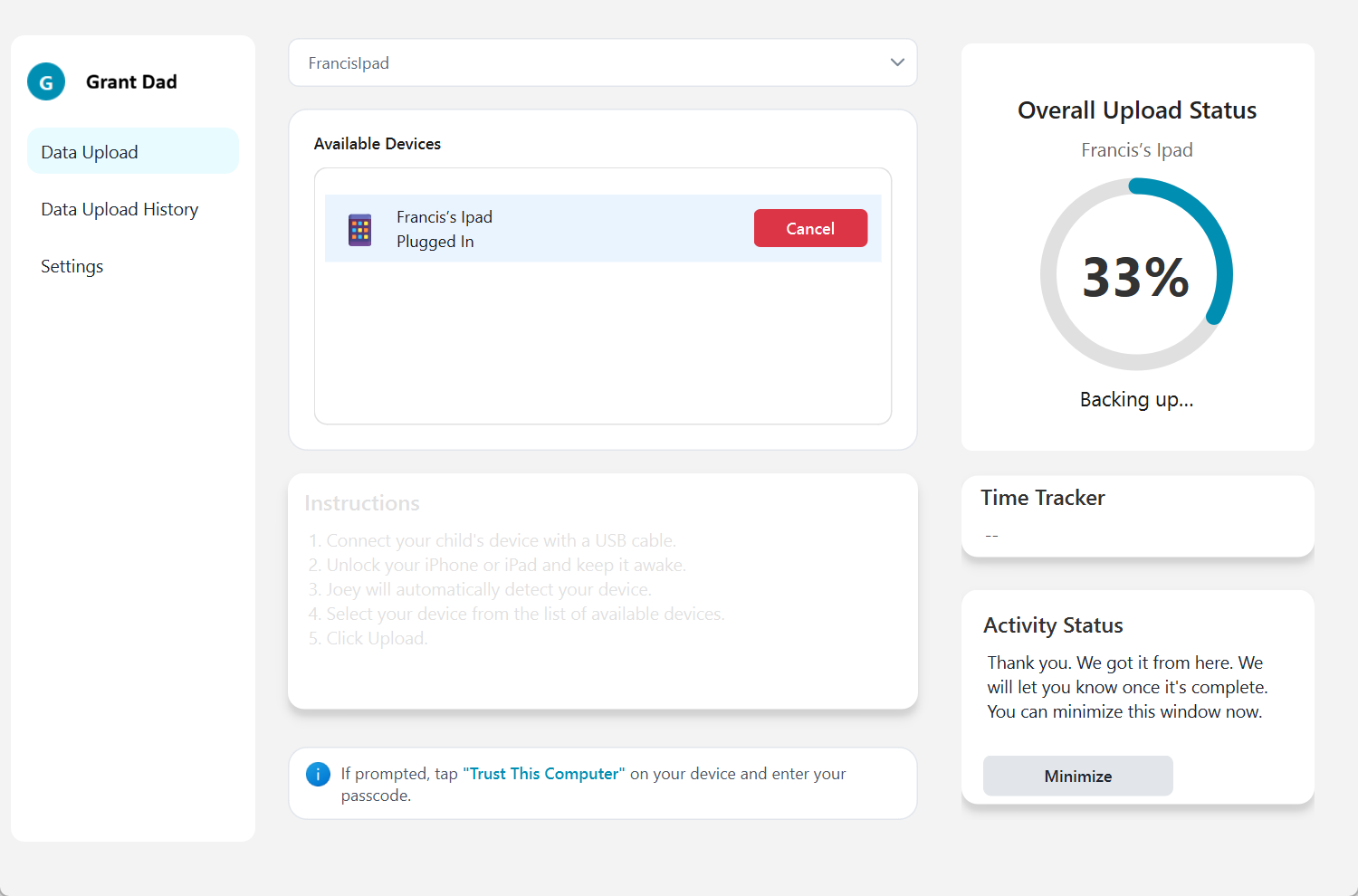 Joey Desktop scans all iMessages and then encrypts them so Joey can process Smart Alerts securely.
Reliability
Joey was more reliable than Bark in our test environment.
- Wired sync reliability: about 99% success for Joey
- Wi-Fi sync reliability: about 80% success for Joey
The remaining 20% is mostly due to the overall complexity Apple forces on this level of integration. iPhone integration is secure, but it is not always smooth.
Alert quality and context
Joey's strongest feature is contextual alerting:
- Alerts tied to the conversation thread
- Patterns over time, not single message pings
- Trends that show whether something is escalating or cooling off
This was the opposite of our experience with Bark and BrightCanary, where we saw too many noisy alerts that lacked thread level context.
Core Feature 1: How's My Child Report
Definitely a unique feature out of all the products on the market. This Report demonstrates the approach Joey Family has taken with holistic analytics vs simple keyword alerts per one message at a time.
The report is a comprehensive assessment of a child based on their entire messaging history and social contacts.
Example report from my son Francis - we found this super interesting to read and accurate.
The Joey Smart Alerts feature
Privacy and security
Joey positions itself around privacy-led alerts. Two design choices matter:
- Joey does not run a keyboard and does not capture every keystroke
- Joey only uploads the authorized monitoring dataset (messages and contacts), not the entire iPhone backup
Joey publicly states it is ISO IEC 27001:2022 certified and that family data is encrypted in transit and at rest, and not used to train or improve detection systems.
What we liked
- Reliable syncing, especially wired
- Better signal to noise than other tools we tested
- Thread level context and pattern awareness
- Web dashboard that works in mixed device households
- Clear privacy posture versus keylogger style tools
What we did not like
- Joey uses parent-controlled, periodic scanning rather than constant live monitoring. Parents can scan manually whenever they choose or schedule one scan each day.
- Wi-Fi sync is not perfect, because Apple pairing and backup flows can be brittle
- Joey is intentionally not built for minute by minute interception
Practical FAQ
Can any app truly monitor iMessage in real-time on iPhone?
Not in the way most parents imagine. Apple states iMessage is protected with end to end encryption so only the sender and receiver can access message content. Monitoring products generally use workarounds: keyboard capture (typed text) or backup and scan (synced history).
Is a keylogger required to monitor apps like Snapchat on iPhone?
If you want broad coverage across many apps and near real-time alerts on iPhone, a keyboard based approach is the most common path. That is why parents should understand the privacy and tamper trade-offs of keyboard level monitoring.
Can kids bypass monitoring apps?
Kids can disrupt monitoring in many ways. The details differ by product, but no installed monitoring approach is invulnerable. This is why monitoring should sit alongside boundaries, conversations, and periodic check ins.
Final thought: monitoring is not parenting
A monitoring app can help you see concerning patterns. It cannot replace:
- clear family rules
- Screen Time boundaries
- ongoing conversations
- teaching kids how to ask for help early
The goal is not perfect control. The goal is a safer digital neighborhood, with the least invasive tools that still give parents meaningful signals.
References (primary sources)
Apple
- iMessage security overview: https://support.apple.com/guide/security/secd9764312f/web
- Custom keyboard open access: https://developer.apple.com/documentation/uikit/configuring-open-access-for-a-custom-keyboard
Safety research
- FBI financially motivated sextortion: https://www.fbi.gov/how-we-can-help-you/scams-and-safety/common-frauds-and-scams/sextortion/financially-motivated-sextortion
- FBI story on the sextortion threat: https://www.fbi.gov/news/stories/the-financially-motivated-sextortion-threat
- NCMEC sextortion data: https://www.missingkids.org/blog/2024/ncmec-releases-new-sextortion-data
BrightCanary
- BrightCanary pricing: https://www.brightcanary.io/pricing/
- BrightCanary FAQ: https://www.brightcanary.io/faq/
- Text Message Plus explainer: https://www.brightcanary.io/brightcanary-text-message-plus/
- BrightCanary Parental Controls (App Store): https://apps.apple.com/us/app/brightcanary-parental-controls/id1634119476 Bark
- Bark pricing: https://www.bark.us/pricing/
- Bark iOS monitoring with Bark Home: https://support.bark.us/hc/en-us/articles/5715479538829-How-to-Monitor-iOS-Devices-with-the-Bark-Home
- Bark iOS monitoring with Bark Desktop App: https://support.bark.us/hc/en-us/articles/24534505377421-How-to-Monitor-iOS-Devices-with-the-Bark-Desktop-App
- Bark iOS coverage list: https://www.bark.us/what-bark-monitors/ios-devices/
- Bark parent app availability: https://support.bark.us/hc/en-us/articles/360049966392-Parent-app
- Bark security and privacy: https://support.bark.us/hc/en-us/articles/360049966232-Security-and-privacy
Joey
- Joey pricing (Basic): https://www.joeyfamily.com/pricing
- Joey iPhone monitoring: https://www.joeyfamily.com/features/iphone-monitoring
- Joey security: https://www.joeyfamily.com/security